


Confirm FLSA status first
The calculator asks whether the employee is covered and nonexempt because exempt employees or non-FLSA overtime may not produce qualified overtime compensation for this deduction.
Estimate the FLSA overtime premium portion for the no tax on overtime deduction, then keep the records behind the number.
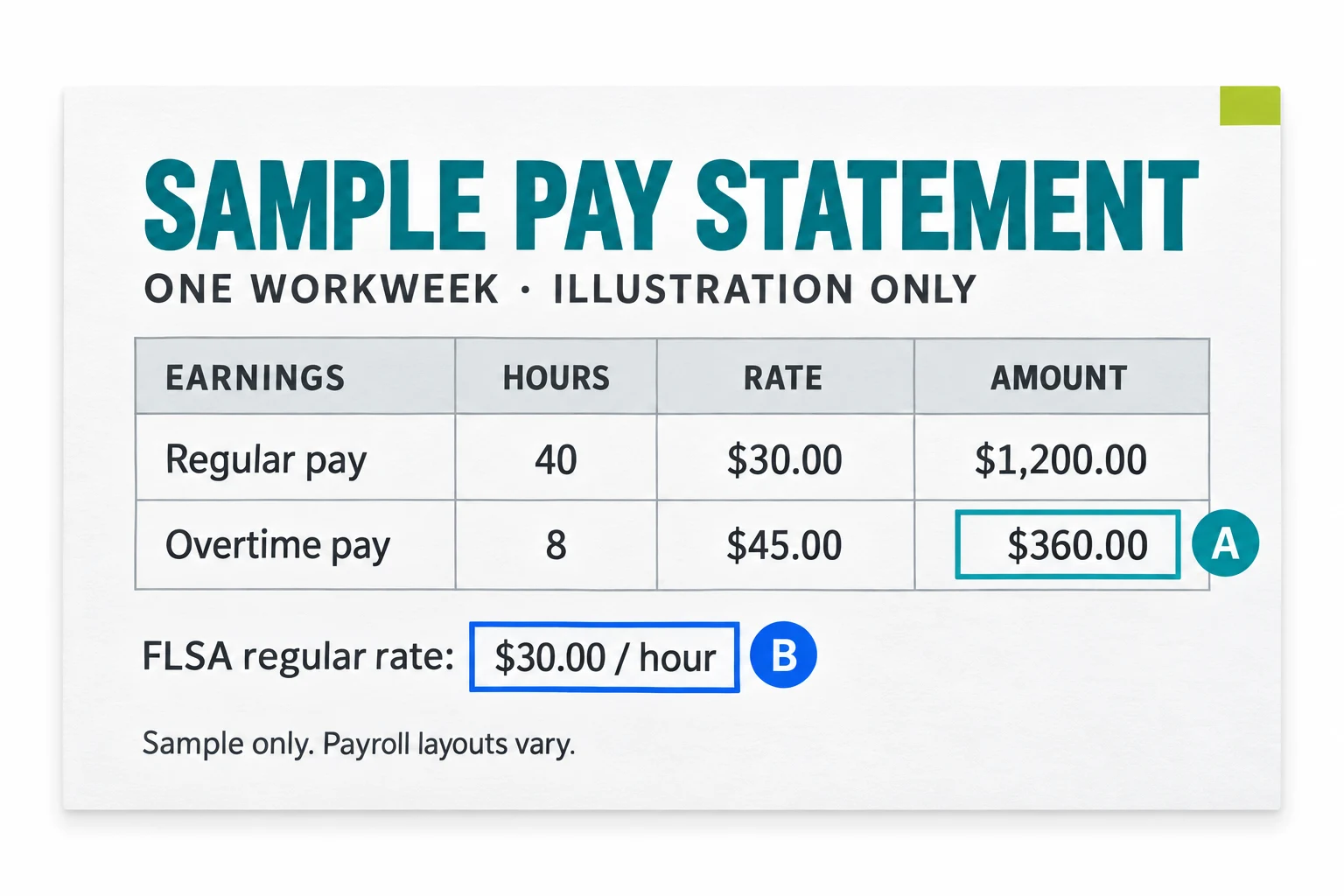
A STANDARD TIME-AND-A-HALF EXAMPLE
At a $30 regular rate, 8 overtime hours pay $360. Of that, $240 is the regular-rate portion and $120 is the half-time premium.
$30.00 × 0.5 × 8 hours = $120.00
Assumes FLSA-covered, nonexempt overtime in one workweek. Personal limits and reporting rules still apply.
Qualified overtime compensation is not every overtime dollar on a paycheck. The starting point is the overtime premium required under FLSA section 7 that exceeds the worker's regular rate of pay.
For typical time-and-a-half overtime, the qualified portion is generally the half-time premium above the regular rate. The regular wages paid for the overtime hours are not the premium portion.
DOL overtime rules focus on covered, nonexempt employees and hours worked over 40 in a workweek. State law, employer policy, contracts, and higher overtime provisions may create extra pay, but this calculator focuses on the federal FLSA premium portion used in IRS qualified overtime guidance.
The calculator asks whether the employee is covered and nonexempt because exempt employees or non-FLSA overtime may not produce qualified overtime compensation for this deduction.
The key record is the overtime premium above the regular rate of pay, not just the total overtime pay line.
Save pay statements, annual summaries, optional 2025 W-2 Box 14 notes, required 2026 W-2 Box 12 code TT reporting, any W-2c corrections, and calculation notes.
Choose the pay record method that matches what you have. If a statement separately reports qualified overtime compensation, use that reported amount. If it shows total time-and-a-half overtime pay, the calculator estimates the half-time premium portion.
If you only have pay stubs, enter the regular rate of pay and overtime hours. The estimate uses the FLSA half-time premium formula and shows warnings when the result needs payroll or tax-professional review.
Use this when a W-2, 1099, portal, or employer statement identifies qualified overtime compensation separately.
Use this when the statement combines regular overtime wages and the overtime premium in one aggregate amount.
Use this when 2025 records do not separately report the amount and you need a documented estimate from rate and hours.
The estimate is not the final tax result. Before you claim the deduction for qualified overtime, review the taxpayer rules and the source records.
For tax year 2025, the IRS has said employers and payers may not separately report qualified overtime compensation on every W-2 or 1099. Some workers may need to calculate a reasonable amount from a Box 14 note, employer statement, payroll portal, or pay stubs.
For tax years 2026 through 2028, employers and other payers are expected to separately report qualified overtime compensation on updated forms. Even then, employees should keep the records that explain the number.

Your handoff should show the formula, the pay records, and any W-2 or 1099 notes you used.
Capture pay period, regular-rate approximation, overtime hours, overtime rate, method, and statement references.
View templatesSummarize the estimated qualified overtime compensation, deduction cap, MAGI warning, source records, and open questions.
Prepare handoffCreate a consistent process for covered, nonexempt employees and route FLSA, payroll, or tax law edge cases to the right professional.
Employer setupNo. QualifiedOvertime.com is not affiliated with the Internal Revenue Service, Treasury, or the Department of Labor. It is an educational tracking tool.
No. IRS guidance focuses on the FLSA overtime premium that exceeds the regular rate of pay. Regular wages paid for overtime hours are not the premium portion.
For 2025, you may need to estimate the amount from employer statements, Box 14 notes, payroll portals, or pay stubs, then keep the method and records for a tax professional.
Exempt employees may not have FLSA overtime compensation for this purpose. Confirm FLSA status and taxpayer-specific facts with payroll, counsel, or a qualified tax professional.
State law or employer policy can create overtime pay, but this calculator focuses on the federal FLSA premium portion described in IRS qualified overtime guidance.
Keep pay stubs, annual payroll summaries, W-2 or 1099 forms, any 2025 Box 14 note, 2026 Box 12 code TT reporting, employer statement, regular rate notes, overtime hours, and the method used.
Official sources
Source baseline checked 2026-09-08
Defines qualified overtime compensation, FLSA overtime eligibility, deduction limits, reporting rules, and taxpayer requirements.
View official sourceSummarizes the deduction cap, MAGI phase-out thresholds, Social Security number rule, and 2025 reporting note.
View official sourceProvides 2025 methods for individuals estimating qualified overtime compensation when separate reporting is not available.
View official sourceExplains 2026 Form W-2 reporting, including Box 12 code TT for qualified overtime compensation.
View official sourceExplains the FLSA overtime baseline for covered, nonexempt employees working over 40 hours in a workweek.
View official source