Definition

What Does Qualified OT Tracking Mean on a Pay Stub?

In QuickBooks Payroll, Qualified Overtime Tracking is a tracking item for the qualified overtime premium, not extra pay. Other payroll systems may use different labels; confirm yours with payroll.

Not affiliated with the IRS, Treasury, Department of Labor, payroll providers, or tax software vendors. For educational and tracking purposes only.

Qualified OT tracking in plain English

QuickBooks uses a Qualified Overtime Tracking pay type or payroll item to record qualified overtime compensation. That is the premium required by FLSA section 7 above the regular rate of pay, not all wages earned during overtime hours. A software label alone does not establish eligibility.

QualifiedOvertime.com provides a separate documentation workflow: compare your pay records, estimate the premium, and keep calculation notes for payroll or a tax professional. This website's workflow is not the definition of the QuickBooks payroll item and does not change your payroll records.

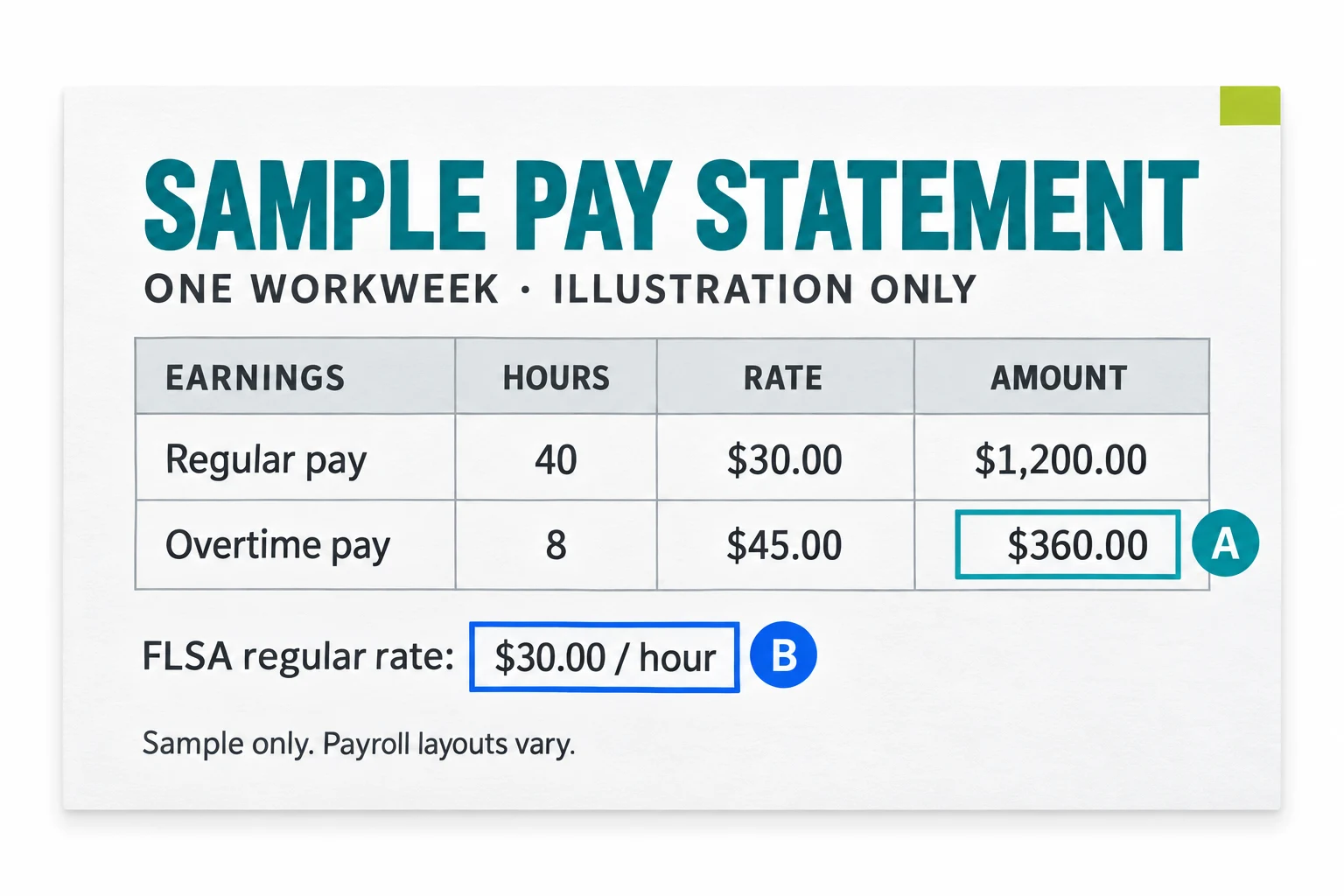
$360 overtime pay, $120 qualified premium

This standard time-and-a-half example assumes a covered, nonexempt employee works 8 overtime hours beyond 40 hours in one workweek, with a $30 FLSA regular rate and no additional regular-rate adjustments.

The sample's A marker identifies total overtime pay; B identifies the regular rate. The $120 premium is included in the $360 overtime payment: it is not extra pay, and it is not a promise of $120 in tax savings.

Do not apply the divide-by-three shortcut to double-time pay, bonuses that change the regular rate, different rates, or overtime required only by state law or employer policy. Ask payroll to determine the FLSA-required portion in those cases.

  • Overtime rate: $30 x 1.5 = $45 per hour; $45 x 8 hours = $360 total overtime pay.
  • Regular-rate portion of those overtime hours: $30 x 8 = $240.
  • Half-time premium: $30 x 0.5 x 8 = $120. For this standard example only, $360 / 3 = $120.
Sample pay statement: $30 regular rate, 8 overtime hours at $45, and $360 total overtime pay.
Illustrative sample, not a QuickBooks screenshot or tax form. Payroll layouts vary; the $120 premium is calculated in the text, not shown as a separate line in this image.

How to check your tracking amount

  • Confirm the payroll system and exact line label with payroll. Check whether the amount covers this pay period or is a year-to-date total; do not add cumulative totals together.
  • Confirm that you are FLSA-covered and nonexempt. Check the regular rate, including any required bonuses or other pay, and the FLSA overtime hours for each workweek. Do not average hours across workweeks.
  • Separate total overtime wages from the premium. For the standard time-and-a-half case above, compare $360 total overtime pay with the $120 premium; do not add the tracking amount to wages again.
  • Ask payroll to explain any difference between your estimate and the tracking line, including adjustments, multiple rates, or non-FLSA overtime. Save the pay stub, calculation method, and payroll response.
  • Reconcile your annual records with the issued W-2. For 2026, follow the Box 12 code TT and W-2c rules below; a year-round estimate is not a substitute for required reporting.

2025 transition records versus 2026 reporting

For tax year 2025 transition records, an employer may provide a W-2 Box 14 note, an employer statement, a payroll portal record, or pay stubs when qualified overtime compensation was not separately reported.

For tax year 2026, the official W-2 and W-3 instructions use Box 12 code TT to report the total amount of qualified overtime compensation. Keep the pay stub and payroll records that explain the reported amount.

If an issued 2026 W-2 omits or understates qualified overtime, request Form W-2c from your employer. A pay-stub estimate cannot replace that reporting; an uncorrected omitted or understated amount cannot count toward the deduction. If the reported amount is overstated, only the actual qualified amount paid can count.

What the QuickBooks tracking item does

QuickBooks documents a tracking item, not another wage payment. Changing only the tracking amount leaves net pay or taxes unchanged; changing other paycheck entries is a different action.

QuickBooks automatic calculation depends on the product, pay types, and FLSA-aligned setup. Some cases require manual entry or review; do not assume every QuickBooks amount was calculated automatically or correctly.

Other payroll systems may use different labels and calculations. Confirm their meaning with your provider. QualifiedOvertime.com is not affiliated with QuickBooks or any payroll provider.

Keep the record trail

  • Pay stubs or paychecks that show overtime hours, overtime pay, and rates.
  • Annual payroll summaries, W-2 forms, and any employer statement or payroll portal export.
  • An optional 2025 Box 14 transition note, or required 2026 W-2 Box 12 code TT reporting. For an omitted or understated amount on an issued 2026 W-2, request W-2c from payroll before using the difference for a deduction.
  • Your calculation method, regular-rate assumptions, and questions for a qualified tax professional.

Tracking has limits

Tracking does not prove you are eligible for the deduction. Not all overtime pay is qualified overtime compensation, and personal taxpayer rules still apply.

The estimate is before deduction caps, income phase-outs, filing-status rules, and Social Security number requirements. Overtime wages generally remain subject to federal income tax withholding, Social Security, and Medicare taxes; a tracking line does not make the paycheck tax-free.

Qualified OT tracking FAQ

Is Qualified Overtime Tracking on my QuickBooks pay stub extra pay?

In QuickBooks, it is a tracking item for the qualified overtime premium, not extra pay. Our website separately helps you document and check records. For another payroll system, ask payroll what its label means.

Why is the tracking amount smaller than total overtime pay?

For a standard FLSA time-and-a-half workweek at a $30 regular rate with 8 overtime hours, $360 total overtime pay includes $240 at the regular rate and a $120 premium. Only the FLSA-required premium is qualified overtime compensation; personal tax limits and reporting rules still apply.

What does Box 12 code TT mean for 2026?

For 2026 reporting, Box 12 code TT reports the total amount of qualified overtime compensation. If an issued W-2 omits or understates it, request Form W-2c from your employer; a pay-stub estimate cannot replace the missing reporting. If overstated, only the actual qualified amount paid can count. Keep the supporting records.

What should I use for 2025 transition records?

For 2025, separate reporting may not be available. Keep any Box 14 note, employer statement, payroll portal record, or pay stub used to document a reasonable estimate.

Does tracking prove I am eligible?

No. Tracking supports the calculation record but does not prove you are eligible. Eligibility and final tax treatment require review of IRS rules and taxpayer-specific facts.

Review the official guidance directly

IRS FAQ FS-2026-13: Qualified overtime compensation deduction

Defines qualified overtime compensation, FLSA overtime eligibility, deduction limits, reporting rules, and taxpayer requirements.

Internal Revenue Service | FAQ

View official source

IRS overview: No Tax on Overtime deduction

Summarizes the deduction cap, MAGI phase-out thresholds, Social Security number rule, and 2025 reporting note.

Internal Revenue Service | Overview

View official source

IRS Notice 2025-69

Provides 2025 methods for individuals estimating qualified overtime compensation when separate reporting is not available.

Internal Revenue Service | Notice

View official source

2026 Instructions for Forms W-2 and W-3

Explains 2026 Form W-2 reporting, including Box 12 code TT for qualified overtime compensation.

Internal Revenue Service | Instructions

View official source

DOL overtime overview

Explains the FLSA overtime baseline for covered, nonexempt employees working over 40 hours in a workweek.

U.S. Department of Labor | Guidance

View official source